Thanks, Omei. Yes, Linda, please let us know if you’re still struggling and we can try to figure out what about your settings might be causing the trouble.
Excellent, thanks for address this
Hi all,
Thanks for getting back to me so quickly. I looked into the trackpad and keyboard system preferences but couldn’t see anything relevant. The keyboard shortcuts seemed all to be ones that had _only_ keyboard keys to work, not anything that included ‘clicks’ as well, and the trackpad preferrences were only for guestures that do things, nothing that combined keys plus trackpad. I tried turning on a few more keyboard shortcuts but it didn’t change anything.
My trackpad is the Apple Wireless Trackpad (ie not a mouse, and not a laptop built in trackpad). It is instead of a mouse, for my iMac 2011 model and came with the iMac as an option from Apple instead of a mouse, so it will be 2011 as well. My iMac is running El Capitan.
I doubt that Adobe Flash can distinguish hardware at that level, mouse, trackpads, wireless or not, it shouldn’t matter… @Linda: when you Cmd-clicked, did you try on both highlighted bases? I believe the detection happens when the yellow one is clicked.
@Linda, I think I’ve found a solution.
BetterTouchTool is a very popular Mac Utility for configuring input devices to do all kinds of crazy things. I had never used it before, but I downloaded the free trial version, and configured my mouse to generate Command-Click events with non-standard keyboard/mouse combinations. Here’s the setup screen where I told it to generate a Command-Click when I did a middle mouse button click while holding down the fn key (but only in Firefox).
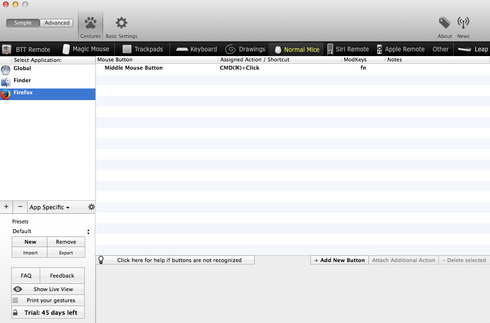
And it works; I can now mark bases in the game using that combination, in addition to the normal Command-cliick.
Seems likely that it will work for your trackpad, too.
Hi Omei,
A great idea, but sadly no go. I downloaded the app, added a new guesture that would perform the action command click and tried it but nothing happened.
I think this is because the action command click is itself not working, so doing something else to perform the action just performs the broken action.
I have started looking at the Apple Support Communities and a couple of other people had the command click stop working with the upgrade to El Capitan, so I will start working through their fixes, or if nothing works, I may just have to wait 'til the next update to the OS for this to work for me.
Thanks so much for all your help. It looks like there is nothing more people can do here, but I will let you all know when the problem is fixed, though who knows when that will be.
Hi guys,
So, it turns out I hadn’t downloaded an update that was waiting. I have done that, and now it works! Yay!
Thanks for all your thoughts. I can now keep going on puzzles.
I’m glad to hear it! Looking forward to seeing you involved in the lab.
The in-game screenshot-to-chat feature is not working. This is a recently discovered issue that hasn’t been a problem before. When the screenshot button is pressed, the dialog box comes up as normal, but selecting either “yes” or “no” does nothing, the dialog box just sits there and the player can’t even go back to the puzzle without reloading the page
reported by two new players and I confirm the same behavior for me
Many thanks for reporting and confirming this problem. Offhand, not quite sure what could be causing the issue, but I’ll raise it with Caleb and we’ll try to figure it out.
I can’t seem to reproduce the problem on my machine. @hoglahoo: can you please give us some more specifics? which puzzle, browser version, Flash version, etc?
The puzzle we were looking at is here, I am using Firefox 45.0
http://www.eternagame.org/game/puzzle/6502962/
[23:45:48] I’d send you a screenshot of mine but for some reason my screenshot won’t work. Try flipping some of your GC pairs though that helped me to solve it
[23:46:02] 12 of gene synthesizer I mean haha
strange
[23:46:39] my screenshot isnt working 
what happens when you select ‘yes send to chat’ or whatever
[23:47:38] it just freezes
[23:48:03] Where did you put your GC pairs @Glitter2 ?
[23:48:19] I just click the direct link and copy and pastes… the yes button doesnt work for me eithe
[23:48:23] Mine freezes for the screenshot too haha. Bear with I’ll load it
…
my screenshot fails as well
This took place around 06:00 UCT on 13 March. However, I cannot now reproduce this issue even when trying previous flash versions of eternaxyz.swf
No clue what the deal was, but for me it was exactly as hi529 described - the “yes” and “no” buttons simply didn’t responde. But if it can’t be reproduced now, not sure theres any use going on about it shrug
Hmm… if it was a one time thing, I thought it may have had to do with me updating something, but I definitely have not done anything with that puzzle or at that time. Let’s just keep an eye on it. If you happen to experience it again (or hear reports), please let us know.
I don’t know that this is related, but I’ve been having a lot issues with other flash game features mysteriously failing, specifically mouse scrolling and the new “rotate” tool. It makes me wonder if there might be some resource leak (e.g. dedicated graphics memory) in the flash app that requires rebooting ones machine to clear.
(I haven’t systematically tried rebooting yet. I tend to just shrug and continue working on what I’m doing.)
May not be related but was having major flash problems in win7, migrated to win 10 over the weekend and all flash weird stuff is gone. Flash seems much more smooth. Now how long that will last I have no idea.
Classic Browser Down
I have had a problem lately. I often get force sent to the new browser.
This is not working for me for several reasons. It gives me extra work on getting back to the classic browser. It was working well for me before when the data browser was an active choice.
I wish to be able to choose. I wish this done smoothly so I don’t have to do anything extra, but simply choose which browser to be sent to as a default and it will remember.
The data browser is not yet stable enough to work in plus it is not capable of doing the same things. I want them both. I want the data browser for play, but the legacy browser for work.
We need to have both browsers around, as they are each capable of something special. Both of which we need. And having both around will also get Omei more time to work out the wrinkles.
I agree. Need both data browsers working until new one is up and running.