Thanks Omei,
I’ve always been big on reading the guides and tutorials created by other players.
Visualizing reverse complements for switches is not easy for me, I have to be able to concentrate. So my main advice is, if you can manage to get that part of your brain working, do what you can to stay in the zone. I am lucky to be able to limit distractions, to help I like to put on some familiar music or listen to Adult Swim cartoons I have heard a hundred times. And of course don’t be afraid to fail. Out of thousands of tries I still only have a handful of winners. One of my favorite resources for guides is Eli’s profile page.
http://www.eternagame.org/web/player/8627/
One thing I forgot to mention. Before I start working on solutions for a lab I create a folder and individual .txt files for the individual puzzles. I frequently paste the promising sequences and notes into the file and save. So when I loose my undo stack I still have a starting point. I use google drive, so it all stays backed up automatically. Most frequent note: close 
1 Like
Also I wish to highlight AndrewKae who has made a great puzzle introduction to the Sequence Stamper Tool. Something that will be most helpful when we are transport past working Riboswitch solves onto new CRISPR puzzle.
to everyone who has contributed to this thread so far, i wanted to echo Omei’s thanks as you’ve helped us make numerous improvements. Over the next week, you’ll start to see the puzzle actually rolled out in the game.
I’ve put up a short blog post here http://www.eternagame.org/web/blog/8065985/ guiding players to this particular thread to collate comments/bugs about the puzzle and other aspects of the rollout like the text & video describing the puzzle, banners, etc.
OK, all the projects are now accepting submissions, with a per-puzzle limit of 150 designs per player. If you do discover any issues with a puzzle, here is a good place to post them.
Go to it!
Thank you Omei for the information
I have reworked a solution for the Control-OFF puzzle:
http://www.eternagame.org/game/puzzle/8047448/
GACGCAUAAAGAUGAGACGCGUUUGAGAGCUACUGACAAUGCUCAUGUGAAAACAUGAGGAUCACCCAUGUGCUUUAGCCAUGGGUGAUCGAGUUACGUGAGUAACUCCAUUGUCAGUAGCAAGUUCAAAUAAGGCUAGUCCGUUAUCAACUUGAAAAAGUGGCACCGAGUCGGUGCUUUUU
The sequence is stable across Folding Engines and gives an MP of 97°C for Vienna and NuPACK, but interestingly gave an MP of 107°C for Vienna2.
I also notice that the pairing probabilities plot does not seem to work with NuPACk, is this correct?
Final thought (for now) on this design. If one’s goal is to stabilize the shape across all three folding engines then there are only a few places (2 or 3 places per hairpin) that the MS2 can be stamped such that the central 4-way junction will be stable in all of them. This limits ones options greatly for possible solutions using this methodology.
The number of places to stamp goes up significantly with the introduction of a single base pair per stack and decreases significantly if the stacks are reduced by a single base pair.
Now that the puzzles are finalized, there is no explicit goal for a design to be judged as good by all three (or even any!) of the energy models. It’s all up to player judgement now, with the folding engines there solely for advice.
FWIW, I think experienced players tend to consider Vienna2 to be the engine that best correlates with our lab results.
2 Likes
Re the partition function (dot plot), NUPACK seems to be working for me. Try rebooting your machine. If that doesn’t work for you, post again, but better a new post at the end of the topic, where more people will see it.
1 Like
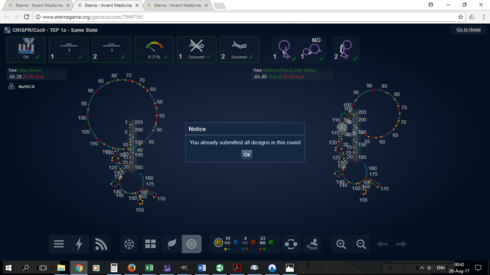
I can’t submit more than 3.
I should point out I was submitting solutions when the limit was 3. But clearing my browser history and deleting and reuploading new solutions hasn’t fixed this since the new limit came in.
It’s the same across all puzzles, even ones I hadn’t posted a solution too. And looking at the puzzle browser for the Control On puzzle, it seems nobody else is submitting more than 3, maybe the new limit isn’t activated? http://www.eternagame.org/game/browse/8047255/
Hm. In your list of submissions, does it _say_ that the limit is 150?
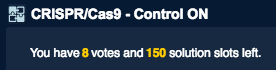
In any case, I’ve alerted Nando to the issue.
Yes, like that, it says the limit is 150 but isn’t allowing more than 3. I’m sure it’ll be fixed soon.
I’m experiencing something strange in the Tetracyclin lab. When I submit my design, it is stable in one of the engines. However when I reopen the design to view it, I can’t make it stable in any engines. However if I copy the sequence from one of the designs and post it into the puzzle for new designing, it turns stable again.
Here is an example. Take this design:
https://www.eternagame.org/game/browse/8047752/?filter1_arg2=8070926&filter1=Id&filter1_arg1…
When I open the design and swap among the engines, none of the versions are stable.
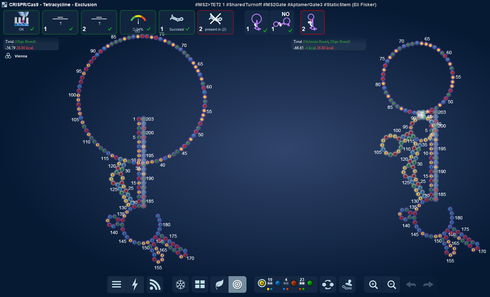
Here is the sequence:
GACGCAUAAAGAUGAGACGCGUUUGAGAGCUACUAAAACAUACCAGCAUGCGAAAGCAUGCAUAAAUCCUCACAUGAGGAUCACCCAUGUGGAGAGGUGAAGAAUACGACCACCUAGUAGCAAGUUCAAAUAAGGCUAGUCCGUUAUCAACUUGAAAAAGUGGCACCGAGUCGGUGCUUUUU
However if I paste the same sequence into the lab design page, it is stable.
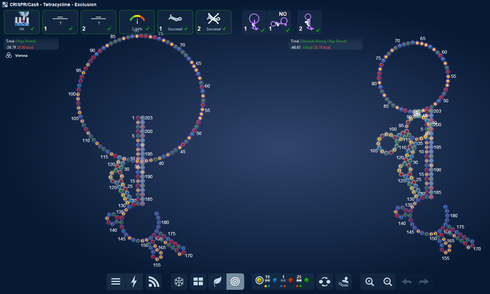
13:00 EST: submitted 6 solutions with no problem. Went back & opened them for review and confirmed acceptance. Control-ON. Thanks.
I’m having the same problem for this lab solve: https://www.eternagame.org/game/browse/8047744/?filter1_arg1=8071271&filter1_arg2=8071271&fi…
This seems to happen in only some labs and not all.
1 Like
Thanks for the report, @whbob.
Can anyone else help us pin this down by posting whether they can or can’t submit more than 3? (I can’t test for myself, because I’ve been given bot privileges.)
I could submit a 4th solution just there, so it might be resolved now
I have been looking at many designs yesterday and i noticed too some of your had odd constraints that were not met.
!(<a href= "Link: https://image.prntscr.com/image/CwYkpNLUSuSgbZNFbv7\_qA.png")https://image.prntscr.com/image/CwYkpNLUSuSgbZNFbv7\_qA.png" height=“500” width=“600”>
https://image.prntscr.com/image/CwYkpNLUSuSgbZNFbv7%5C_qA.png%22)
Use #Hashtags to make design clusters
I wish to recycle a fine idea of Nandos as a way for us to make the most from our slots.
Using Hashtags to Improve Lab Collaboration and Experimentation
By giving your design a # + a keyword, you will make it way easier to pull out your group of designs later and compare results.
Word of advice. Stick the hashtag in the design title. The description field usually doesn’t make it to the spreadsheet. And from experience I know that we always get the spreadsheet first and the data upload to the lab is regularly much slower.
Experiments
This round we have so many slots that there will be plenty of space for doing experiments.
-
You could do groups of 10 or 20 designs testing a specific idea. I like to call this design clusters or sibling designs. With a hashtag you could mark them as belonging together.
-
You could test a specific idea for a group of designs and then do a control group without that feature for similar amount of designs.
This is called science
Some ideas for what to do
I have already challenged you guys to make designs with double and triple aptamers. Plus seeing to that they are symmetric in both states
For more ideas you can see what I have tested out in last round.
2 Likes